TRUSTED BY 4000+ BRANDS WORLDWIDE! TRUSTED BY 4000+ BRANDS WORLDWIDE! TRUSTED BY 4000+ BRANDS WORLDWIDE! TRUSTED BY 4000+ BRANDS WORLDWIDE! TRUSTED BY 4000+ BRANDS WORLDWIDE! TRUSTED BY 4000+ BRANDS WORLDWIDE! TRUSTED BY 4000+ BRANDS WORLDWIDE! TRUSTED BY 4000+ BRANDS WORLDWIDE!

How to Create Clothing Mockups in Illustrator in 2026

Key Takeaways (TL;DR)

  • Create clothing mockups in Illustrator using editable vector garment shapes and design elements.
  • Customize garment colors, graphics, stitching, and small details without rebuilding the entire mockup.
  • Use clipping masks so logos, artwork, and patterns sit neatly on the clothing.
  • Make both front and back views to show clothing designs more clearly.
  • Use editable vector clothing mockups to speed up apparel design and create multiple variations. 

Creating a clothing design is only part of the process. Before production, client approval, or presenting a new collection, you need a clear way to visualize how to design and actually look at the garment. 

Clothing Mockups in Illustrator help with that. You can draw the clothing form, swap color options, place artwork on top, and adjust seams or other construction marks. You can also test different versions without losing the ability to edit the files later.

For designers working on streetwear collections or building a clothing brand, this can make the design process much faster and more organized. In this guide, you’ll learn how to create a clothing mockup in Adobe Illustrator from the garment base to the final export.

Why Use Illustrator for Clothing Mockups?

Adobe Illustrator is particularly useful for apparel concepts because it works with vector artwork. That means your garment shapes and design elements can be resized and edited without losing the clean appearance of the artwork.

Create Scalable Garment Designs

Vector artwork gives you control over the shape, proportions, and construction of your garment You can also work on the details that matter for how a garment is built. Instead of starting over, you can change small parts by editing points.

This comes in handy when you test multiple items. It is also helpful if you want new versions of the same style.

Change Colors Quickly

A single garment can become several colorways without recreating the mockup. You can select individual sections, apply new colors, and experiment with combinations until the design feels right.

Control Small Garment Details

Illustrator also lets you build details such as collars, cuffs, pockets, seams, hems, sleeves, and stitching. These details help the mockup communicate the structure of the actual garment more clearly.

For designers creating apparel concepts, that level of control makes an Illustrator clothing mockup much more useful than a simple flat image.

What You Need Before Creating a Clothing Mockup?

You don’t need a complicated setup to get started.

Adobe Illustrator

You’ll need Adobe Illustrator to create and edit the vector artwork. Familiarity with basic tools such as the Pen Tool, Direct Selection Tool, Layers, Pathfinder, and Clipping Mask will make the process easier.

A Garment Base

You have two main options.

You can draw the garment from scratch, which gives you complete control over the shape and construction.

Or, you can start with an editable clothing vector mockup and customize it for your project. This is often the faster option when you’re working on multiple garments or developing an entire collection.

Your Clothing Design

Have your design elements ready before you begin. This could include:

  • Logo or brand mark
  • Artwork or illustration
  • Typography
  • Patterns
  • Color palette
  • Placement ideas
  • Garment reference images

Having these elements ready keeps the mockup process focused on visualization rather than searching for assets halfway through the workflow.

How to Create Clothing Mockups in Illustrator: Step-by-step

How to create clothing mockups in Illustrator

Step 1: Set Up Your Illustrator Artboard

First, open Illustrator and make a new document. Pick an artboard size that matches where the mockup will be used.

Before you draw, organize your layers. You can use a basic setup like this:

  • Garment
  • Construction Details 
  • Graphics 
  • Colors
  • Effects

Keeping these elements separated makes future edits much easier.

If you will do both front and back views, separate them right away. Put the front in its own layer group, and the back in another group with a clear name.

This kind of organization might feel small at the start. Later, when the mockup gets more complex, you will really notice the time saved. 

Step 2: Create or Add Your Garment Base.  

If  you are creating the garment yourself, begin with the overall silhouette.

Use the Pen Tool to sketch the main shape. Aim to get the proportions right. After the silhouette looks right, switch to the Direct Selection Tool. Adjust the curves and move the anchor points until they look clean.  

If you are using a vector template instead, drop the garment into your Illustrator file. Check each piece one by one. Make sure the parts sit where they should.  

A template helps because it saves you from remaking the usual garment structure. That leaves more time for the real clothing design.

Step 3: Add Garment Construction Details

Once the main shape is ready, build the details that make the garment recognizable.

Depending on the garment, this could include:

  • Collar or neckline
  • Sleeves
  • Cuffs
  • Pockets
  • Waistbands
  • Hems
  • Seams
  • Stitching
  • Panels

Use separate shapes and paths wherever possible. This keeps individual components easier to edit later.

Don’t overload the mockup with unnecessary details. Add enough information to communicate the garment’s structure clearly while keeping the artwork clean.

Step 4: Add Colors to Your Clothing Mockup

With the garment structure in place, start testing colors.

Select individual garment sections and apply your chosen colors. You can create multiple colorways by duplicating the garment and changing the relevant fills.

This is particularly useful for clothing brands developing several variations of the same product.

Keep the garment details visible when changing colors. Seams, outlines, folds, and construction elements should continue to provide visual definition instead of disappearing into the base color.

Step 5: Add Your Logo, Artwork, or Graphics

Now bring your actual clothing design into the mockup.

Place your logo, illustration, typography, or artwork over the garment and adjust its size and position.

Think about the intended placement:

  • Center chest
  • Left chest
  • Full front
  • Back
  • Sleeve
  • Pocket area
  • Multiple placements

Keep the graphics on a separate layer from the garment. This allows you to move, resize, or replace artwork without disturbing the underlying garment.

This step is where a basic garment template starts becoming a real clothing concept.

Step 6: Use a Clipping Mask for Clean Artwork Placement

A clipping mask is one of the most useful techniques for creating clean apparel visuals in Illustrator.

Start by placing your artwork over the area of the garment where you want it to appear. Then create a shape that defines the printable area.

Place that shape above the artwork, select both elements, and use Object → Clipping Mask → Make.

The artwork will now remain inside the defined shape.

This technique is especially useful when you’re placing large graphics on T-shirts, hoodies, jackets, or other garments. You can continue editing the artwork while keeping its visible area controlled.

Step 7 : Add Seams, Shadows, and Finishing Details   

Your mockup will look much more convincing when the garment construction is clearly communicated.  

Add details such as stitching, seams, folds, subtle shadows, and highlights where appropriate.

The goal isn’t to turn a vector mockup into a photorealistic image. The goal is to make the garment easy to understand.

For example, a seam should help show where two garment sections meet. A fold line can help communicate the shape of the fabric. A pocket outline can make the garment structure immediately clear.

Keep these details subtle and consistent.

Step 8: Create Front and Back Views 

For many clothing projects, one view isn’t enough

Make a front view and a back view.  This lets you point out where the graphics go, where the labels sit, and how patterns and stitching details are placed.

Keep the size and shape the same in both views. Match the colors and the design elements too.

If you are building a set of apparel items, use streetwear mockups as a quick way to check the design from more than one side.  

Front and back views are also helpful for sharing a clothing idea with clients. They can support the next step in production planning. 

Make Your Illustrator Clothing Mockup Easier to Edit

A good mockup isn’t just visually clean. It should also be easy to update.

Keep Your Layers Organized

Separate the garment, graphics, colors, and construction details. Avoid placing everything into one complicated layer.

Keep Artwork Editable

Don’t flatten elements unnecessarily. Editable artwork gives you more freedom when creating new colorways or adjusting placement.

Create Reusable Colorways

Instead of rebuilding the garment for every variation, duplicate the artwork and modify the colors. This lets you explore several directions quickly.

Use Ready-Made Vector Mockups When Speed Matters

Drawing every garment from scratch can become repetitive, especially when you’re developing an entire collection.

If you want to focus more on your designs and less on rebuilding garment structures, Hoodie Vector Mockups can give you a ready-made Illustrator starting point for apparel concepts.

Start Creating Faster With Vector Mockups

How to Export Your Clothing Mockup From Illustrator?

Once your mockup is finished, review the artwork before exporting.

Check:

  • Garment proportions
  • Graphic placement
  • Color consistency
  • Seams and construction details
  • Front and back views
  • Layer organization
  • Artboard alignment

Keep the original Illustrator file so you can make future edits.

For presentations or design sharing, export a suitable final format based on how the mockup will be used. Always keep your editable source file separately so you can return to the design later.

If you’re building several clothing concepts, save organized master files that can be duplicated for future designs. A clean file structure can save significant time as your collection grows.

Once your design is ready to move toward manufacturing, you can also use a tech pack for your clothing brand to organize important design and production specifications.

Common Mistakes to Avoid When Creating Clothing Mockups

Creating a mockup is straightforward once you understand the workflow, but a few mistakes can make the process unnecessarily difficult.

Starting With an Inaccurate Garment Shape

The garment base affects everything that comes afterward. Spend time getting the proportions right before adding graphics.

Poor Graphic Placement

Don’t place artwork without considering the garment’s shape, seams, and intended print area.

Making Details Too Heavy

Thick outlines and excessive effects can make a vector garment look cluttered. Use details to communicate structure, not to overwhelm the design.

Flattening Artwork Too Early

Keep important elements editable while you’re still working on the design.

Ignoring Front and Back Consistency

If you’re presenting both views, make sure the colors, proportions, and design elements match.

Rebuilding Every Garment From Scratch

Learning the process is valuable, but you don’t always need to manually draw every garment. Reusable vector mockups can remove repetitive work and give you more time to focus on creative decisions.

Final Thoughts

Learning how to create clothing mockups in Illustrator gives you more control over how your clothing concepts look before they move further into the design or production process.

You can build garment shapes, test colorways, position graphics, refine construction details, and create front and back views while keeping the artwork editable.

But you don’t need to redraw every garment every time. If you’re developing multiple clothing designs, starting with editable vector templates can help you move from concept to presentation much faster.

When you’re ready to spend less time rebuilding garments and more time pushing your designs forward, explore OxygenGrey’s clothing design resources.

​Frequently Asked Questions

Can you make clothing mockups in Illustrator?

Yes. Adobe Illustrator can be used to create editable vector clothing mockups. You can build garment shapes, add construction details, apply colors, place graphics, and create multiple design variations.

How do I create a clothing mockup in Illustrator?

Create a clothing mockup in Illustrator by following these steps:
1) Set up your artboard, 

2) Create or add the garment base, 

3) Add construction details, 

4) Apply garment colors, 

5) Add your logo or artwork, 

6) Use a clipping mask for clean artwork placement, 

7) Add seams, shadows, and finishing details, and 

8) Create front and back views before exporting.

What Illustrator tools are useful for clothing mockups?

The Pen Tool, Direct Selection Tool, Layers, Pathfinder, and Clipping Mask are particularly useful. Together, they give you control over garment shapes, details, colors, and artwork placement.

Are vector clothing mockups better than drawing garments from scratch?

It depends on the project. Drawing from scratch gives you complete control, while ready-made vector clothing mockups can significantly reduce repetitive work. For designers creating multiple garments, editable templates can make the workflow much faster.
How to Find a Clothing Manufacturer for Your Clothing Brand in 2026

Key Takeaways (TL;DR)

  • Define your clothing product first. Pick the garment type, the quality level you want, the budget you can spend, and your target timeline.
  • Get your tech pack and specifications ready before you reach out. Include sizes, fabric options, stitch and seam info, and the design files.
  • Find clothing manufacturers through Google, supplier directories, trade shows, referrals, and sourcing sites.
  • Narrow it down by comparing real details. Look at MOQ, sample cost, pricing, what they can make, how they handle quality, how they communicate, lead times, and the production terms.
  • Decide where to produce based on what you are making. Match the region to your order size, your budget, your target customers, and your shipping plan.
  • Order a sample and check it first. Confirm fit, fabric feel, construction, measurements, and the overall build before you start bulk orders.

Finding a clothing manufacturer for your clothing brand is one of the biggest steps between having the clothing idea and turning it into a real product.

For new clothing or streetwear brands, the process can feel overwhelming. You end up comparing factories, figuring out MOQs, discussing fabrics , asking for samples, checking costs, and confirming they can build what you drew.

The good news is that you do not need to contact hundreds of factories blindly.

A better approach is to define your requirements first, create a shortlist of relevant manufacturers, compare them using the same criteria, and test the relationship with samples before placing a larger order.

This guide explains how to find a clothing manufacturer, where to search, what to ask, how to compare manufacturers, and how to choose a manufacturing region.

Why Finding the Right Clothing Manufacturer Matters

A manufacturer does more than make your garments. How they handle communication, how their production runs, their rules for quality, their minimum order amount, and quality standard will affect your final product.

The right fit depends on your specific needs.A streetwear producing limited collections may need a different manufacturing setup from an established brand placing larger repeat orders. 

That is why the goal is not simply to find a clothing manufacturer. You need to find one that can realistically work with your product, quantity, quality expectations, and production requirements.

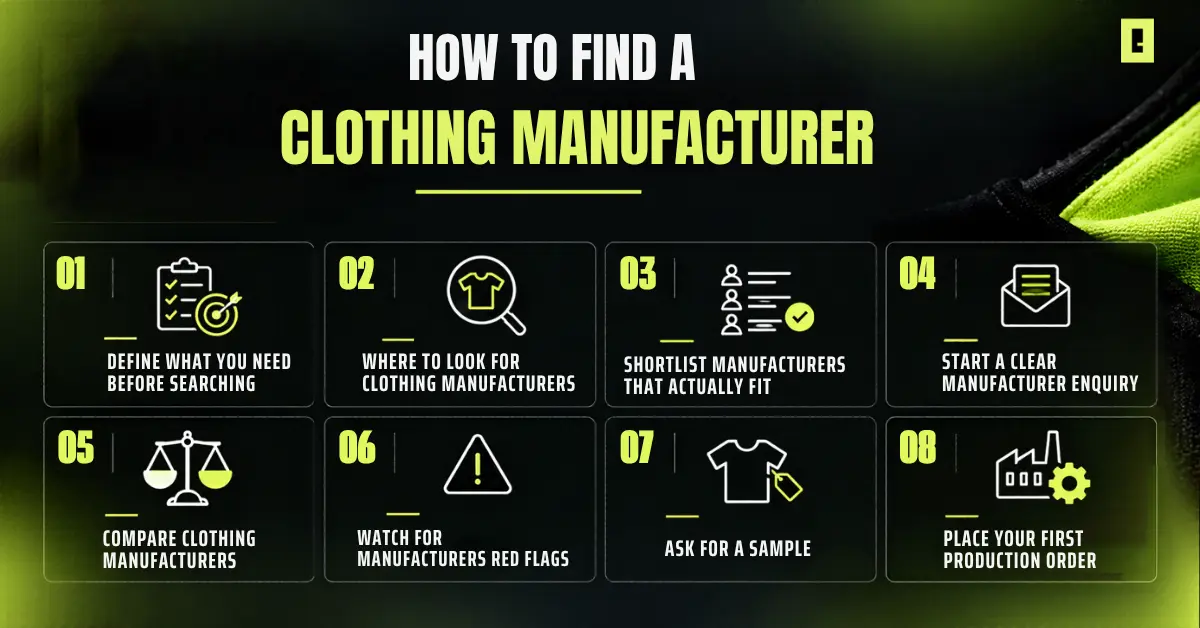
How to Find a Clothing Manufacturer for Your Clothing Brand

Start with your product specifications, then search for manufacturers that match those requirements. After you have a short list, ask for pricing, get clear answers to specific questions, compare responses, and order samples before committing to production. 

How to find a clothing manufacturer for your clothing brand

Step 1: Define What You Need Before Searching

Before searching for a clothing manufacturer, get clear on what you want to produce.

Requirement What to determine
Product T-shirt, hoodie, jeans, jacket, tracksuit, etc.
Fabric Fiber, weight/GSM, finish, stretch, and other requirements.
Quantity Estimated first-order quantity and future volume
Quality Construction, fit, finishing, and quality expectations
Design Artwork, colors, trims, labels, and placement
Budget Target production cost and overall development budget

The clearer your requirements are, the easier it is to find makers that match what you need.

Prepare Your Tech Pack

If you plan on custom production, make a tech pack first. Do this before you reach out to manufacturers.  

A tech pack can list things like: technical drawings, key measurements, fabric choices, how the garment is built, trims, where artwork goes, color options, and other build notes.  

With that in hand, the manufacturer has a solid reference. They do not have to guess from rough sketches, quick chats, or assumptions.  

If you need help preparing one, see How to Make a Tech Pack for Your Clothing Brand.

Step 2: Where to Look for Clothing Manufacturers

Once your requirements are clear, start building your manufacturer list.

  • Online Manufacturer Directories

Manufacturer directories can help you discover factories based on location, product type, capabilities, or production requirements.

If you sell to the U.S., The Department of Commerce’s Made in USA Sourcing & Products Directory is one official starting point for finding textile and apparel suppliers.

  • Google and Direct Search

Google can be surprisingly useful when you search specifically for what you need.

Instead of searching only for “clothing manufacturer,” try terms such as:

  • Custom clothing manufacturer
  • Streetwear clothing manufacturer
  • Small batch clothing manufacturer
  • Cut and sew clothing manufacturer
  • Private label clothing manufacturer
  • Custom hoodie manufacturer

Adding your product type or preferred location can make the results much more relevant.

  • Trade shows and Industry Events

Trade shows can give you the opportunity to speak directly with manufacturers, examine fabrics and samples, and understand what a factory specializes in.

They can be particularly useful if you want to develop longer-term supplier relationships. 

  • Referrals and Industry Networks

Ask designers, brand owners, fashion professionals, and other people in your network about manufacturers they have worked with.

A referral does not automatically mean a manufacturer is suitable for your brand, but it can give you a useful starting point for your research.

Step 3: Shortlist Manufacturers That Actually Fit 

Do not just message every factory you can find. First, remove manufacturers that clearly  do not match your requirements.

Look at: 

  • Product Specialization
  • Minimum order quantity
  • Customization capabilities 
  • Fabrics and materials options
  • Sample work
  • Production scale
  • Location
  • Communication
  • Expected Lead times
  • Quality control

Step 4: Start a Clear Manufacturer Enquiry

Start by sending enquiries to each manufacturer on your shortlist. Use the same core details for every contact.

For the first message, include the basics:

  • Who you are
  • What garments you plan to make
  • How many pieces you expect
  • Fabric needs
  • Any custom work you want
  • Who will buy the items
  • What samples you want
  • Your target dates
  • Whether you already have a tech pack

Also ask these items:

  • MOQ for each style or color
  • Sample cost
  • Bulk production cost
  • How long the samples take
  • Bulk order lead time
  • How they source the fabric
  • Payment terms
  • Shipping options
  • Options for labels and packaging
  • How they do quality checks

Step 5: Compare Clothing Manufacturers

Price should  not be the only thing you compare.  

A manufacturer with a lower quote may not be the better fit if their MOQ, sample process, communication, or production capabilities do not match your requirements. 

This can happen when the MOQ, sample work, or production limits do not line up with what you need.

Try to look at the completed picture:

  • Can you meet their minimum order?
  • Does the price support your margin and your unit plan?  
  • Will they test the fabric and change samples the way you ask?  
  • Can they build your garment style and important details? 
  • Do their past items match what you want to sell?  
  • Do they reply in a clear way and stay steady throughout?  
  • Can they deliver by the dates you need for your launch?  
  • Are payment, shipping, and other terms written in simple terms?

Step 6: Watch for Manufacturer Red Flags

Be cautious with a manufacturer if you notice these issues.

  • Avoids answering simple questions.
  • The prices may look unclear, or they may keep changing.
  • Cannot explain MOQ.
  • Refuses to provide relevant samples.
  • Not giving enough details about production
  • Cannot communicate clearly

One strange reply by itself does not always mean the manufacturer is not trustworthy.

Step 7: Ask for a Sample

Do not go straight from the design file to a big production run. If you can, create a sample first.

A sample gives you the real garment to judge. You are not stuck with only pictures or written descriptions.

Check these items:

  • Fit and measurements
  • Fabric and fabric weight
  • Stitching and construction
  • Print or embroidery
  • Color match
  • Trims and hardware
  • Labels
  • Final finish quality

If you notice any issue, write it down. Then ask for a new sample or a revision when it makes sense.

Sampling also shows you how the manufacturer handles your notes. This helps you decide if you are ready for bulk production.

Step 8: Place Your First Production Order Carefully 

Place your first production order with care. After you pick a manufacturer and sign off on the sample, do not rush the last step.

Before production starts, double check every item on your list. Include these details in the final version:

  • Approved sample  
  • Measurements  
  • Fabric and materials  
  • Colors  
  • Artwork  
  • Labels and trims  
  • Quantity  
  • Unit price  
  • Total cost  
  • Production timeline  
  • Delivery terms  
  • Payment schedule 

Also, keep all final specifications and approvals organized so there is a clear record of what was agreed.

Choosing Your Clothing Manufacturing Region

There is no single manufacturing country that works for every clothing brand.

Your choice should depend on the type of garment, order quantity, target cost, quality requirements, location of your customers, shipping considerations, and the individual manufacturer’s capabilities.

Region What to consider
Portugal Often considered by brands looking for European production and premium apparel development.
Italy Commonly associated with fashion manufacturing and premium/luxury production; costs and factory requirements vary.
Turkey Its location can be useful for brands considering European and nearby markets, with a broad textile and apparel industry.
Romania & Poland European options worth researching for brands that want production closer to European markets.
China Large and diverse manufacturing ecosystem with many apparel production capabilities; factory selection is critical.
Vietnam A significant apparel manufacturing market, particularly worth researching for brands looking at established production facilities.
USA Can be relevant for brands prioritizing domestic production or proximity to the U.S. market, depending on product and budget.

These are starting points, not guarantees of quality, pricing, or MOQ. Conditions can differ significantly between individual factories within the same country.

How to  Choose the Right Region

Start by asking a few simple questions.

  • Who are my customers?

If your buyers are mostly in one area, choose a production spot that is nearer to that market. This can change shipping time and make handling easier.

  • What quantity am I ordering?

Your expected volume can determine which manufacturers are willing to work with you.

  • What quality do I need?

Some manufacturers specialize in particular garment types, fabrics, construction methods, or quality levels

  • What is my target production cost?

Do not only look at the unit price. Compare the full total cost so you can see what you will actually pay.

  • How complex is the product?

A basic garment and a heavily constructed streetwear piece may require very different manufacturing capabilities.

CMT vs. Full-Package Manufacturing

You might also see CMT (Cut, Make, Trim) and full-package manufacturing.

With a CMT, the manufacturer generally  focuses on cutting, sewing, and finishing the garments while the brand may need to arrange materials and other production inputs. 

The brand often has to arrange fabric and other items needed for production. Full-package manufacturing usually covers more steps.  

That can include finding materials and overseeing parts of the garment development process.

The exact services included can vary between manufacturers, so always ask what is included in the quoted price.

Bring Your Clothing Designs to Life

Common Mistakes to Avoid When Finding Clothing Manufacturer

Contacting Manufacturers Without Specifications

A vague enquiry usually produces vague answers. Give manufacturers enough information to understand what you actually want

Ignoring MOQ

Always check MOQ before spending time on detailed discussions. A factory may be excellent but unsuitable if its minimum order is far beyond your planned quantity.

Skipping the sample stage  

Requesting a sample helps you spot issues early. This can stop small defects from turning into a full production problem.

Sending Different Information to Every Manufacturer

Use the same core specifications when requesting quotes. This makes your comparisons much more meaningful. 

Final Thoughts

Finding a clothing manufacturer becomes much easier when you treat it as a structured sourcing process rather than a simple Google search.

Start with a clear product brief and tech pack that shows materials, sizes, and key details. This keeps back and forth low.

Then make a small list of possible factories. Contact them with the same questions each time. Ask about lead times, fabric options, and past work that matches your style. Compare answers side by side, not just the cost.

After that, ask for samples. Review fit, stitching, and finish in the way your brand needs. Only then decide on bulk production.

Most importantly, choose a manufacturer based on how well their capabilities and production process match your specific clothing brand, not simply on where they are located or how low their initial quote looks.

Frequently Asked Questions

How do I find a clothing manufacturer for my brand?

Start by defining your product, quantity, materials, quality requirements, and budget. Then search directories, Google, trade shows, referrals, and industry networks to build a shortlist of manufacturers that match your requirements.

What should I ask a clothing manufacturer before placing an order?

Ask about MOQ, pricing, sample costs, production timelines, fabric sourcing, customization, payment terms, shipping, labels, packaging, and quality control. Also confirm exactly what is included in the quoted price.

Do I need a tech pack to work with a clothing manufacturer?

For custom clothing production, a detailed tech pack can help communicate measurements, materials, construction, artwork, and other production specifications clearly. It gives the manufacturer a shared reference during sampling and production.

What is MOQ in clothing manufacturing?

MOQ means Minimum Order Quantity. It is the smallest quantity a manufacturer requires you to order, and it can vary by manufacturer, garment, fabric, color, and production requirements.

Should I request a sample before placing a bulk clothing order?

Yes, when sample development is available, reviewing a sample before bulk production lets you check fit, fabric, construction, artwork, measurements, and finishing. It also gives you an opportunity to request changes before committing to a larger order.

How do I choose the right clothing manufacturing country?

Consider your product type, order quantity, target cost, quality requirements, customer location, shipping, and the manufacturer’s specific capabilities. The best location depends on your project rather than simply choosing a country based on its reputation for apparel production.

How to Create Fashion Illustration in Procreate: A Beginner’s Guide

Key Takeaways (TL;DR)

  • Learn how to create fashion Illustration in Procreate from a croquis to a finished garment.
  • Set up your canvas and organize layers for sketches, garments, colors, shadows, and textures.
  • Build strong garment silhouettes before adding construction details like seams, pockets, collars, and folds.
  • Use Procreate tools such as Layers, Symmetry, QuickShape, Selection, and Transform to refine your designs.
  • Add color, fabric textures, shadows, and highlights to communicate different materials and garment details.
  • Avoid common mistakes and use real garment references to create clearer, more believable fashion Illustration.

​Fashion ideas don’t always arrive fully formed. You might start with a silhouette, a sleeve detail, a fabric idea, or a color combination. The challenge is turning that quick idea into something you can actually see, refine, and present.

That’s where fashion illustration in Procreate becomes powerful. You can sketch directly on your iPad, build garments in layers, test different colors, reshape details, and explore multiple versions without rebuilding the entire design from scratch.

If you are new to digital fashion drawing, or if you are building pieces for a collection, a strong Procreate workflow can help you move from a rough sketch to a finished fashion illustration.

What You Need for Fashion Illustration in Procreate

You don’t need a complicated setup to start creating digital fashion artwork. A focused toolkit is enough to build, refine, and present your designs.

iPad and Apple Pencil

An iPad gives you a portable workspace for developing fashion concepts. Apple Pencil adds the hand control needed for everything from loose sketching to precise garment details.​

Pressure sensitivity is particularly useful when you’re building line weight, sketching folds, defining seams, or adding subtle shading.

​Procreate

Procreate is your space for drawing and editing. It can handle the full illustration from start to finish.

​For fashion work , a few tools matter more than everything else: layers, brush types, Selection tools, Transform tools, symmetry options, QuickShape, and the color controls.

​You don’t need to master every feature. You need a workflow that helps you move quickly from idea to garment.

Fashion croquis  

A fashion croquis provides the figure and proportions you can build your garment around.

Instead of repeatedly drawing the body, you can spend more time on the clothes. Look at the outline, the fit, how it moves, and the small design bits.

Procreate Brushes

Brushes can completely change the feel of a fashion illustration.

Use clean brushes for sketches and clean lines. Then switch to textured brushes when you want to hint at real fabrics. Think denim, fleece, knit, leather, or canvas.

You are not aiming to use every brush you own. Choose the right Procreate Assets to match the look of your collection.

How to Set Up Your Canvas for Fashion Illustration in Procreate

Before drawing the first line, think about where the illustration is going.

A concept created for Instagram doesn’t necessarily need the same setup as artwork being prepared for a portfolio, client presentation, or print.

Choose your canvas dimensions and resolution based on the final use. Starting with an appropriate canvas gives you more flexibility later and avoids unnecessary quality loss.

Organize Your Layers

A clean layer structure can make your entire fashion illustration in Procreate easier.

A simple setup could be:

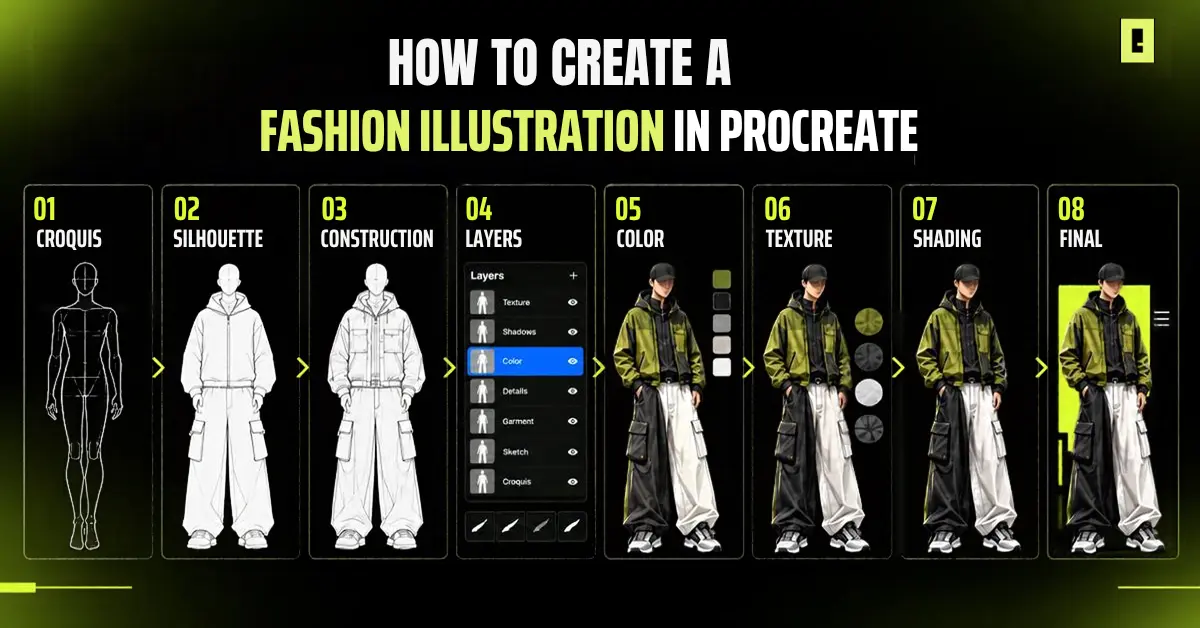
Croquis → Rough Sketch → Garment → Details → Color → Shadows → Texture

Keep major elements separate whenever possible.

Need to change the sleeve? Edit the garment layer.

Want to test another color? Adjust the color layer.

Want to try a different fabric treatment? Modify the texture layer.

This flexibility is one of the biggest advantages of working digitally.

How to Create a Fashion Illustration in Procreate

How to Create a Fashion Illustration in Procreate


The strongest fashion Illustrations aren’t built by trying to perfect everything at once.  

​Start with the big idea. Establish the silhouette. Develop the garment. Then bring in color, texture, and detail.

​You can use this practical workflow:

Step 1: Start With a Fashion Croquis

Place your fashion croquis on its own layer and lower its opacity. Create a new layer above it for your garment sketch.

The croquis acts as your framework. It helps you judge proportions, placement, and how the garment interacts with the body without forcing you to redraw the figure every time.

Keep the early sketch loose. You’re developing the design, not finishing it.

Step 2: Sketch the Garment Silhouette

Start with the overall shape.

Focus on:

  • Shoulder width
  • Neckline
  • Sleeve shape
  • Waist placement
  • Garment length
  • Overall volume
  • Hemline

Don’t worry about buttons, stitching, or fabric texture yet.

First ask: Does the silhouette work?

A strong silhouette gives the rest of the design something to build on. If the shape feels wrong, fix it before spending time on small details.

Step 3: Add Garment Construction Details

Only after the silhouette feels solid, define how the garment is made.

Depending on the design, this could include:

  • Collars
  • Pockets
  • Buttons
  • Zippers
  • Seams
  • Cuffs
  • Stitching
  • Panels
  • Pleats
  • Folds

These details give the garment structure and make the illustration communicate more than just an outline.

This is where fashion sketching in Procreate starts becoming a real design-development process.

Step 4: Build the Illustration with Layers  

Avoid putting the entire design on one layer.  

Split your sketch, garment, fabric shape, colors, shadows, and textures so you can experiment without damaging the original work.

If you want to change something, duplicate the garment layer.  Then adjust the sleeve, tweak the neck opening, or shift the overall shape. You can even swap to a new silhouette and still keep the old one.  

For designers developing several concepts, this method saves time.

​Step 5: Add Color to Your Fashion Illustration  

Once the structure works, start exploring color. Do not lock in the first palette that looks good.

Make small changes and compare the results. Color choices can shift how the clothing feels.  

For instance:

  • Black with gray can look crisp and precise.  
  • Earth tones can push the look toward practical workwear aesthetics.  
  • High-contrast colors can give a streetwear concept more energy.

Because your color work can remain separate from the garment sketch, testing different directions becomes simple.

​Step 6: Add Fabric Texture and Material Details

Color establishes the direction. Texture makes the material believable.

​A washed denim jacket should not have the same treatment as silk. Heavy fleece, nylon, leather, and knit fabrics all show light in their own way.

​Using the right brush can make these material differences easier to communicate. Procreate fabric brushes can help add texture and surface detail without overwhelming the garment.

​Add texture only to suggest materials such as :

  • Denim
  • Cotton
  • Knitwear
  • Leather
  • Nylon
  • Fleece
  • Canvas

Keep the texture controlled. You do not need to texture every spot on the garment.

​Place texture where it matters. It helps viewers read the material and gives the design more depth.

​Step 7: Add Shadows and Highlights

Shading gives the garment dimension and helps communicate volume.

Look at where the fabric folds around the body and where light would naturally hit the garment.

Add shadows around:

  • Folds
  • Seams
  • Under collars
  • Sleeves
  • Pockets
  • Overlapping fabric

Then add subtle highlights to areas where the material catches light.

Don’t over-render everything. A fashion illustration should remain clear enough for the garment, silhouette, and design details to stay in focus.

​Step 8: Refine the Final Illustration

Now step back from the canvas.  

Pull your view back so you can see the design as a whole instead of getting lost in individual details.

Check your:  

  • Silhouette
  • Proportions
  • Garment placement
  • Line quality
  • Color balance
  • Texture
  • Shadows
  • Unnecessary marks

Clean up anything distracting. Your last illustration should show the clothing clearly right away.

Once your fashion concept is developed, you can take it further with clothing vector mockups for presenting garment designs clearly.

Procreate Tools That Make Fashion Illustration Easier

You can make solid fashion art in Procreate without using every feature. A few right tools can make your workflow more efficient.

Symmetry  

Symmetry can help when you’re developing garments that require balanced construction

It gives you a quick way to establish the overall structure before refining the individual elements of the design.

QuickShape  

QuickShape helps create cleaner geometric forms and controlled lines.  

It works well for garment details like buttons, zippers, seams, and other lines that are straight or gently curved.

Selection and Transform

Use these tools when your design is close to working but needs adjustment.  

You can modify:  

  • Sleeves  
  • Collars  
  • Pockets  
  • Necklines  
  • Overall garment proportions  

Instead of redrawing the entire illustration, make the change where it matters.

Layers

Layers are a key part of a flexible Procreate fashion Illustration setup.  

Keep your sketch, garment, color, shadow, and texture on separate layers. This makes changes simpler and gives you more control over every stage of the design

Take Your Fashion Designs Further with Digital Assets

Tips for Better Fashion Illustration in Procreate

Tools are part of it, but your workflow matters just as much .

1) Keep Your Croquis and Garment Separate

Keeping the figure and garment on separate layers gives you more control and makes revisions easier.

2) Don’t Overload the Illustration

More marks do not always mean a stronger drawing. Pick the small bits that explain the garment. Focus on how it is built and what it looks like at a glance.

3) Use the Right Brush for the Job

A single brush doesn’t need to handle the entire illustration. Use different brushes for sketching, clean linework, shading, and material texture.

4) Build Texture Gradually

Start subtle. Too much texture can compete with the silhouette and make the design harder to read. Add enough to communicate the material without overwhelming the garment.

5) Save Different Design Versions

If you create an interesting variation, keep it. Digital workflows make it easy to explore multiple directions, so don’t delete a strong idea simply because it isn’t your final version yet.

6) Use Real Garment References

Study real clothing, fabrics, construction details, silhouettes, and folds.

References help you understand how garments actually behave and make your Illustration feel more intentional and believable.

Common Fashion Illustration Mistakes to Avoid

A good digital process helps. Still, a few mistakes can weaken a fashion sketch.

Drawing Everything on One Layer  

This makes revisions harder than they need to be. Make separate layers for the main elements of your illustration so you can edit them independently

Ignoring Garment Proportions

A strong color palette can’t fix a silhouette that doesn’t work. Spend more time getting the shape right before moving into detailed rendering.

Adding Texture Too Early

Texture should support the garment, not hide structure problems. Get the silhouette and construction right first. Add material treatment later.

Over-Rendering

Not every part of the illustration needs heavy shading or intricate detail. Keep the visual hierarchy clear so the garment remains the focus.

Forgetting the Purpose of the Illustration

Think about where the artwork will be used. A collection concept, portfolio piece, client presentation, social post, and production reference may all require different levels of detail.

​Final thoughts

Good fashion work begins with one clear idea. But you need  the right workflow to turn that idea into something tangible. With Procreate, you can sketch freely, experiment with silhouettes, explore color and texture, and refine your designs without slowing down the creative process.

Whether you’re developing your new collection, making a portfolio, or just trying out fresh concepts, fashion illustration in Procreate gives you the freedom to create, experiment, and push your designs further.

Ready to create? Explore OxygenGrey for Procreate assets designed to support your fashion design workflow

Frequently Asked Questions

Can you create fashion illustration in Procreate?

Yes. Procreate can be used to create fashion sketches and polished digital Illustration, including garment silhouettes, construction details, color, shading, and fabric textures.

Is Procreate good for fashion design?

Yes. Procreate is particularly useful for fashion concept development, sketching, color exploration, garment visualization, and presentation artwork.

How do you design clothes in Procreate?

Start with a fashion croquis, establish the garment silhouette, add construction details, and then develop color, materials, texture, and shading using separate layers.

What brushes are best for fashion illustration in Procreate?

The best brushes depend on the stage of the design. A practical setup usually includes brushes for sketching, clean linework, shading, and fabric or material textures.

Can Procreate be used for professional fashion sketches?

Yes. Procreate can be used to create polished fashion sketches for portfolios, collection concepts, client presentations, and digital fashion development.

How to Make a Tech Pack for Your Clothing Brand

Key Takeaways (TL;DR)

  • Learn how to make a tech pack that clearly communicates your design to manufacturers.
  • Understand the essential components, from technical drawings and measurements to fabrics and construction details.
  • Learn how to document artwork, labels, trims, colorways, and other production specifications.
  • Organize your tech pack to streamline sampling, revisions, and production.
  • Use a final checklist to catch missing details before you send anything to a manufacturer.

If you have a clothing design ready for production, a sketch alone isn’t enough. Learning how to make a tech pack helps you turn your design concept into clear instructions that a manufacturer can follow.

A tech pack brings important specifics like technical drawings, measurements, materials, construction, and artwork requirements into one organized document. This gives your manufacturer one clear reference, instead of assumptions or scattered messages and files.

In this guide, we’ll cover how to make a tech pack for your clothing brand, what information to include, and how to prepare your specifications for sampling and production.​

​What Is a Tech Pack for a Clothing Brand?  

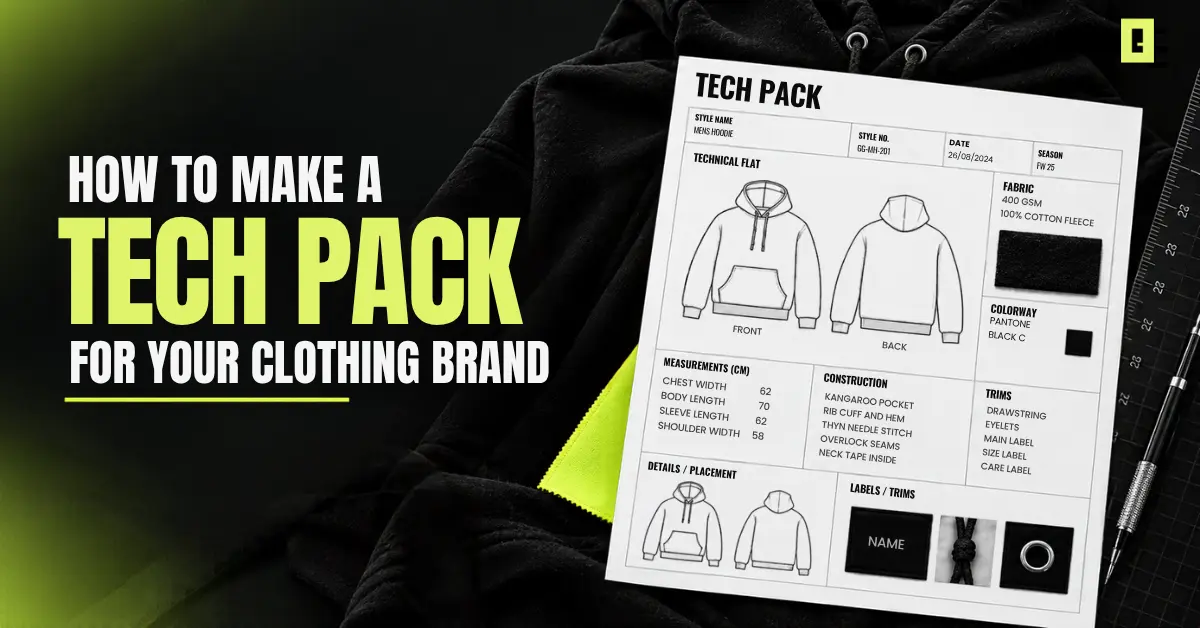
A tech pack is a document that holds the technical and production specifications for a garment. It takes your visual concept and translates it into clear information so manufacturers can build samples and produce the final product.

What Does a Tech Pack Do?

  • A well-prepared clothing tech pack serves as a central reference point between your brand and your manufacturer. It helps you:
  • Communicate the garment design through technical drawings, plus visual references.
  • Document production specifications such as measurements, fabrics, construction, and trims.
  • Make one shared reference that designers and manufacturers can work from.
  • Translate a visual concept into production details that can be followed during sampling and manufacturing.

A fashion sketch shows the creative vision, while a fashion tech pack provides the technical information needed to turn that vision into a physical garment.

Why Does Your Clothing Brand Need a Tech Pack?

A tech pack keeps your design and production information organized, making conversations with manufacturers clearer and reducing avoidable mistakes.

Reduce Miscommunication with Manufacturers

When you have clear drawings, measurements, and specifications, there’s less space for guesswork.

Make Sampling More Accurate

Detailed measurements, materials, and construction notes help manufacturers create samples closer to your intended design.

Keep Your Designs Consistent

A single approved tech pack gives everyone the same reference throughout development.

Make Production Easier to Repeat

The finalized specifications can be reused and updated for future production runs.

Keep Every Product Detail Organized

Drawings, measurements, fabrics, trims, labels, artwork, and colorways can all be managed in one document.

How to Make a Tech Pack: Step-by-Step Guide

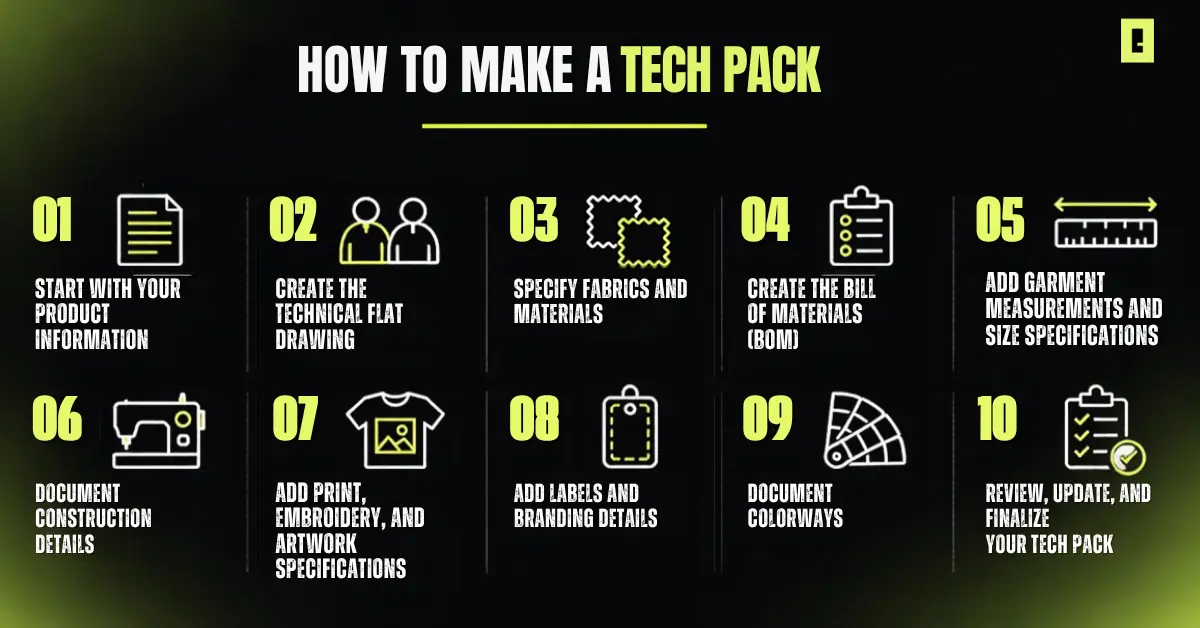
Once you know what a tech pack should include, learning how to make a tech pack becomes much easier. Start with the basic product information, then work out the technical and production specifications step-by-step

How to make a tech pack for your clothing brand


Step 1: Start With Your Product Information

These details are the starting point for how to make a tech pack because they identify the exact garment being developed.

Include:

  • Brand name
  • Style or product name
  • Style number
  • Product category
  • Collection or season
  • Sample size
  • Date
  • Version or revision number

Keeping this information consistent helps manufacturers identify the correct style and makes sure everyone is working from the latest version.

Step 2: Create the Technical Flat Drawing

A technical flat is a clean, accurate representation of your garment. Include a front and back view, and add a side view when it’s really needed. Also show the important items like pockets, seams, collars, cuffs, closures, and other design features.

​Use crisp technical lines and add enlarged detail views for complex areas. Avoid unnecessary poses, shadows, textures, or fashion-illustration effects that can make production details harder to understand.

​If you need editable garment visuals for your design workflow, Clothing Vector Mockups can help you create clear clothing visuals more quickly. They support the design process, but they don’t replace the full technical specifications that belong in a proper tech pack.

Step 3: Specify Fabrics and Materials

Clearly document the materials required for the garment. Depending on the product, include:

  • Main fabric and fiber composition
  • Fabric weight or GSM
  • Color
  • Finish
  • Lining
  • Thread
  • Other required materials

Simply specifying “cotton” may not be enough. Details such as composition, weight, color, and finish can affect the garment’s final appearance and feel, so be as specific as your manufacturer requires.

Step 4: Create the Bill of Materials (BOM)

The Bill of Materials (BOM) is basically the list of physical components you need to make the garment. It helps the manufacturer get a clear view of exactly what materials and trims are required.

A BOM may include:

  • Main fabric
  • Rib
  • Thread
  • Zippers
  • Buttons
  • Drawcords
  • Labels
  • Hardware
  • Other trims

Keeping these components in one list makes it easier to check that nothing important is missed during sampling and production.

Step 5: Add Garment Measurements and Size Specifications

This part is an important piece of how to make a tech pack, because it shows document measurements clearly, so the manufacturer knows exactly what to measure and how the garment should actually fit.

Include:

  • Base or sample size
  • Points of Measure (POM)
  • Garment measurements
  • Size range
  • Grading
  • Tolerances

Each size should  have its specified measurement, with consistent units, and make the measurement points clearly defined. That way it’s easier to compare the samples with your intended fit, and spot what adjustments might be needed.

Step 6: Document Construction Details

The technical drawing shows what the garment looks like. Construction notes explain how it should be made.

Depending on the garment, document:

  • Seam and stitch types
  • Hem construction
  • Neckline or collar
  • Cuffs
  • Pockets
  • Closures
  • Reinforcements
  • Special finishing

Focus on details that could affect the garment’s fit, appearance, or construction. Clear instructions help reduce guesswork during sampling.

​Step 7: Add Print, Embroidery, and Artwork Specifications

For graphic and streetwear brands, you really need production instructions that are clear. Don’t simply attach the artwork file; specify how and where it should appear. Clothing mockups can also help a lot so you can picture the artwork placement and the overall presentation before you lock the final design.

Include:

  • Artwork placement
  • Print dimensions
  • Print or embroidery technique
  • Artwork colors
  • Front, back, sleeve, or other placement
  • Special effects
  • Wash or finish instructions where relevant

For example, instead of writing “front graphic,” specify the exact location and the dimensions. This gives the manufacturer a clear reference for reproducing the design.

Step 8: Add labels and branding details

Make sure you document all the branding elements that will be attached to the garment, including:

  • Main brand label
  • Size label
  • Care label
  • Hangtag
  • Label dimensions
  • Label placement
  • Attachment method

Clear label specifications help the branding show up consistently across samples and then again in production.

Step 9: Document colorways

If the garment is going to be released in a few different versions, document each colorway in a really clear way. Include:

  • Garment colors
  • Color references
  • Artwork color variations
  • Trim colors
  • Different color combinations

This stops confusion later, when the same style gets produced in several color options, even if people think they remember which one was which.

Step 10: Review, Update, and Finalize Your Tech Pack

Before sending your tech pack to the manufacturer, review the complete document and check:

  • Are all measurements included?
  • Are units consistent?
  • Are materials clearly specified?
  • Are artwork dimensions correct?
  • Are construction details clear?
  • Are labels documented?
  • Are colorways identified?
  • Is the version and date updated?
  • Are all supporting files attached?

Explore Design Resources for Your Clothing Brand

Common Tech Pack Mistakes Clothing Brands Should Avoid

Even a well-designed garment can face production issues if important is missing or unclear. Avoid these common mistakes when preparing your tech pack.

Using Only a Fashion Illustration

A fashion illustration communicates the overall creative idea, but it usually lacks the technical detail needed for manufacturing. Make sure to add real technical sketches and specifications alongside the visual concept.

Missing or Incomplete Measurements

Missing measurements or unclear points of measure can lead to fit issues and additional sample revisions. Make sure required measurements are clearly documented for each relevant size.

Leaving Materials Too Vague

Specifications such as “black cotton” but it’s usually not detailed enough. Include relevant information such as fabric composition, weight, color, finish, and other material requirements.

Forgetting Artwork Placement Details

Don’t assume the manufacturer will know where artwork should be applied. Specify placement, dimensions, colors, and print and embroidery method.

Not Documenting Trims and Labels

Small components such as buttons, zippers, drawcords, labels, and hardware can still affect the final garment. Include them in the BOM and provide relevant specifications.

Sending an Outdated Version

If specifications change during sampling, update the tech pack and its revision details. Sending an old version can result in manufacturers following specifications that are no longer approved.

Assuming the Manufacturer Will Fill in the Gaps

Your manufacturer can provide production expertise, but important design decisions should not be left to guesswork. Document the specifications that define your intended garment as clearly as possible.

Final Thoughts

Learning how to make a tech pack helps you turn your clothing concept into clear enough, actionable instructions for your manufacturer. From technical drawings and measurements to fabrics, construction details, artwork, branding, every specification helps bring your design closer to the finished garment.

Take the time to keep your tech pack clear, accurate, and updated . Because the better your specifications are, the easier it gets to share your vision, review samples, and move toward production.

For cleaner garment visuals and a more efficient design workflow, explore OxygenGrey’s digital design assets.

​Frequently Asked Questions 

​What is a tech pack in clothing?

A clothing tech pack is a production document that contains garment specifications, such as drawings, measurements, fabrics, construction details, artwork, labels, and trims.

How do you make a tech pack for clothing?

Start with the product details, then add technical drawings, materials, BOM, measurements, construction details, artwork, labels, and colorways, before you do a final review of the whole document.

What should be included in a clothing tech pack?

A clothing tech pack usually includes product information, technical flats, measurements, sizing, fabrics, BOM, construction details, artwork, colorways, labels, trims, packaging, and revision details.

Do I need a tech pack to manufacture clothing?

Yes, a tech pack gives the manufacturer a solid reference for your garment’s design, measurements, materials, and construction, helping avoid confusion during sampling and production.

What software can I use to create a tech pack?

You can use vector design software for technical drawings, spreadsheets for measurements and BOMs, and document-layout tools to organize the final tech pack.